
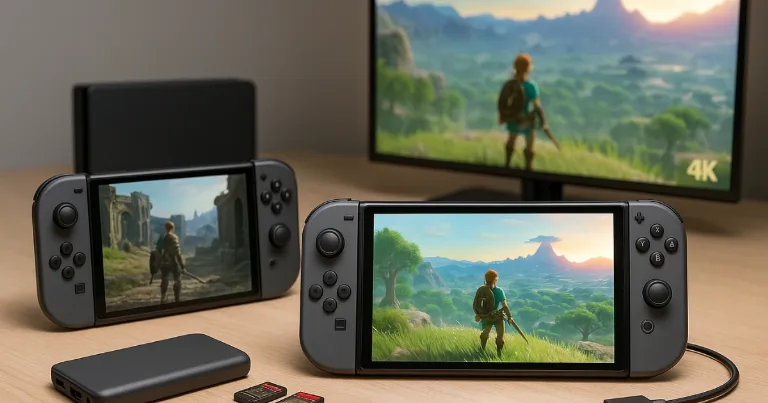

Big question for a lot of players right now, buy the cheaper Switch or go for Switch 2. I spent time testing, reading notes, and watching players share long term stories. This piece cuts the noise and focuses on changes you feel while playing.
| What changes in week one | Switch 1 | Switch 2 |
|---|---|---|
| Load waits | Longer pauses in big games | Noticeably faster restarts and map jumps |
| 4K TV look | 1080p scaled by the TV | Sharper image up to 4K with AI |
| Handheld screen | Smaller 720p display | Larger 1080p display with HDR10 and VRR |
Core hardware changes that impact play
-
CPU and GPU, Switch 2 has a far newer chip, faster cores, and a better graphics block with AI upscaling. You see quicker menus, quicker loads, and steadier frame rate in new games.
-
RAM, more memory on Switch 2 lets games hold higher quality textures and larger worlds without hitching.
-
Storage, Switch 2 ships with more usable space, and it loads faster than even a fast microSD on the old model.
-
Build, thicker rails and a tighter shell on Switch 2 make the handheld feel more solid in a backpack.
Bottom line, Switch 1 still runs a giant library well, but Switch 2 is the only way to play new first party hits with full features.
Screen size, brightness, and color differences
-
Size, Switch 2 has a larger panel with slimmer borders. Text is easier to read, maps are less squint heavy.
-
Resolution and HDR, Switch 2 uses a 1080p panel with HDR10 and variable refresh rate support up to 120 Hz.
-
Color and motion, better color accuracy and faster response cut blur in fast games.
-
Touch, more precise touch fixes small tap misses in games with menus.
If you play handheld most of the time, the screen jump alone can feel like the upgrade.
Real game performance, frame rate, and load times
-
Modern engines on Switch 2 hit higher and more stable frame rates. You feel smoother camera turns, quicker input response, and fewer drops in busy scenes.
-
Older Switch games often get higher resolution and faster loads on Switch 2, even without a paid patch.
-
New exclusives target features like better shadows, longer draw distance, and denser crowds that the old system cannot handle.
-
Fast travel and restarts take seconds on Switch 2 in games that crawl on Switch 1.
Tip, if you replay long RPGs, the time saved on loads adds up over weeks.
Battery life, heat, and fan noise
-
Battery range is shorter on Switch 2 in heavy games, due to the stronger chip. Expect more frequent top ups during long weekends.
-
Heat is handled better, the fan curve is smarter, so noise is a soft whoosh instead of a sudden whine.
-
Charging care settings on Switch 2 help protect the battery if you dock every day.
-
Portable banks still work great, but pick a bank that supports USB PD for best results.
If you play two to three hours a night, both systems are fine. For travel, bring a charger either way.
Joy‑Con and stick durability, drift risk
-
Fit and feel are improved on the new Joy‑Con, with a slightly bigger grip and firmer rails.
-
Sticks are redesigned but still based on contact parts, not magnetic parts.
-
Drift risk remains, though the new design aims to last longer. Keep a can of contact cleaner in your kit, and learn the quick recalibration steps.
-
Pro Controller 2 has the best sticks of the family and is a smart buy for TV play.
For kids, a good silicone grip and a stick cap can extend life and comfort.
Docked output, TV features, and resolutions
Nintendo’s official Switch 2 specifications confirm the screen, storage, and output limits below.
-
Output on Switch 2 goes up to 4K on a TV. The system can render at a lower resolution, then scale up with an AI method.
-
Frame rate output reaches 60 fps at 4K, while 1080p and 1440p output can support up to 120 fps in compatible games and displays.
-
Switch 1 tops out at 1080p output, and scaling is handled by the TV.
-
Quality of life, a cleaner dock fit and a nicer LED make it easier to see status from across the room.
On a 4K set, Switch 2 games can look sharper and text is easier to read from the couch. My Switch 2 TV setup guide covers the display settings that matter.
Storage options and moving saves between systems
-
Internal storage is larger and faster on Switch 2. Games launch quicker even when space is tight.
-
microSD storage is different. Switch 2 requires a microSD Express card for game data. Older microSD cards can only be used to copy screenshots and videos from a Switch.
-
Save transfers are simple, but read each game’s note. A few online heavy titles keep cloud saves locked to the same account on the same region.
-
Households with many users should plan the move in order, parent account first, then child accounts.
Do a clean up before you migrate. Archive games you do not play, then move the saves you care about.
Backward compatibility and game upgrade paths
-
Most Switch games run on Switch 2, many with better load times, higher resolution, and steadier frames, no patch needed.
-
Some titles gain optional paid or free upgrade packs for textures, shadows, or new control options.
-
A small list is not supported or has feature cuts. Check each game page before you buy DLC.
-
Physical carts from Switch 1 work on Switch 2, but expect patches on first launch for best play.
If you follow horror games, the Resident Evil 7, Village, and Requiem on Switch 2 date is February 27, 2026.
My take, if you love a series, the best way to replay it now is on Switch 2.
Accessory support, what carries over and what does not
-
Works, original Switch Pro Controllers, most wired headsets, and most Bluetooth audio. Storage cards and cases need extra care because Switch 2 uses microSD Express and has a larger shell.
-
Mixed,
-
Old docks do not output 4K, use the new dock for a 4K TV.
-
Some grips are too small for Switch 2.
-
Third party Joy‑Con rails and extenders may not latch as tight.
-
-
Does not,
-
Old flip cases that wrap the whole body, due to the new size.
-
A few niche USB accessories that relied on the old dock’s ports layout.
-
Check size match on any hard case. A snug fit is great, a tight fit can warp the shell.
Price and value in 2025, who should upgrade
-
Buy Switch 2 if you want new first party games, cleaner TV play, faster loads, and you play both handheld and docked.
-
Buy a used Switch 1 if you play cozy games, turn based RPGs, indie hits, and you need the lowest price. The library is huge and dirt cheap on sale.
-
Upgrade later if you are mid backlog and mostly on a 1080p TV. Wait for a bundle or a seasonal sale.
-
Trade in timing is best near big game launches, when demand spikes and store promos add extra value.
Quick comparison
| Feature | Switch 1 | Switch 2 |
|---|---|---|
| Output on TV | Up to 1080p | Up to 4K with AI upscaling |
| Handheld screen | Smaller, dimmer outdoors | Larger 1080p LCD, HDR10, VRR up to 120 Hz |
| Performance | Good in older games | Higher frame rate, faster loads |
| Battery range | Solid in most games | Shorter in heavy games |
| Joy‑Con sticks | Known drift issues | Redesigned, drift risk reduced, not removed |
| Storage | Small internal, microSD support | 256 GB internal, microSD Express for game storage |
Who should keep the original
-
You only play a few hours a week.
-
Your favorite games are not getting big upgrades.
-
You share the system with a kid who likes the light Switch Lite feel.
-
You already own a Pro Controller and a 1080p TV.
Buying tips and setup checklist
-
Pick a case that fits the new shell. Test the latch and hinge.
-
Use a microSD Express card for Switch 2 game storage, then format it in the console.
-
Turn on the battery care setting if you leave the system in the dock.
-
Set up family accounts and parental limits before game installs.
-
Migrate saves, then test a few games you play daily.
The simple pick for your time and screen
Both systems still give a fun play loop that fits life. Switch 1 is the budget king, with more than enough games for years. Switch 2 is the better long term buy for new releases, sharper TV play, and faster loads. Pick the one that fits your time, your screen, and your price.