

Several GeForce NOW users are running into the same Assassin's Creed Black Flag Resynced problem: the session starts, begins initializing, and then sends them back to the Play page. I had the same issue, and adding the Ubisoft+ copy to My Games in Ubisoft Connect before resyncing fixed it for me.
Add Black Flag Resynced to My Games
Open Ubisoft Connect with the same Ubisoft account linked to GeForce NOW, then follow these steps:
Open the Ubisoft Connect PC app.
Go to Library → Ubisoft+.
Find Assassin’s Creed Black Flag Resynced.
Click the three dots beside the game.
Select Add to My Games if it appears. If it is missing, check My Games because the game may already be added.
Open My Games and confirm that the game appears there.
Return to GeForce NOW.
Go to Settings → Connections → Ubisoft.
Press Resync.
Search for Black Flag Resynced and launch the Ubisoft Connect version.
Select Mark as Owned first if GeForce NOW asks.
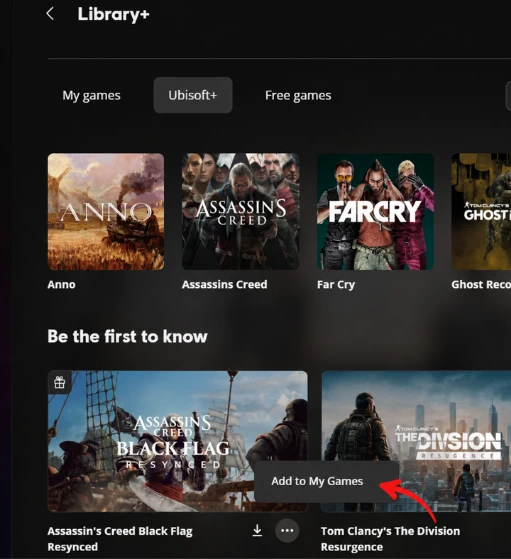
The Ubisoft library step is the part that solved it for me. NVIDIA says GeForce NOW's Sync feature only adds Ubisoft+ games already present in the Ubisoft Connect PC library. Resyncing before the game appears under My Games may therefore leave it unavailable through the linked account.
You do not need to install the full game through Ubisoft Connect. You only need to add it to the account library before returning to GeForce NOW.
Why the session returns to the Play page
Ubisoft+ gives you access to Black Flag Resynced, but the game may not be added automatically to your Ubisoft Connect library.
GeForce NOW can still show the title and begin preparing a cloud session. The launch may then stop when the linked Ubisoft account does not show the game under My Games.
Adding it to the library lets GeForce NOW detect the Ubisoft+ entitlement during the next resync.
This method is for the Ubisoft+ or Ubisoft Connect version. If you bought the game through Steam, select Steam when launching it instead.
Reconnect Ubisoft if it still will not open
Only try this after checking that Black Flag Resynced already appears under My Games.
Open GeForce NOW → Settings → Connections, disconnect Ubisoft, and connect the same account again. Complete the sign-in, press Resync, and then launch the Ubisoft Connect version.
Some people needed this extra reconnect after adding the game to their library, but it was not required for everyone. Start with the Ubisoft Connect library step first, then use the account reconnect only if the session still closes during initialization.