


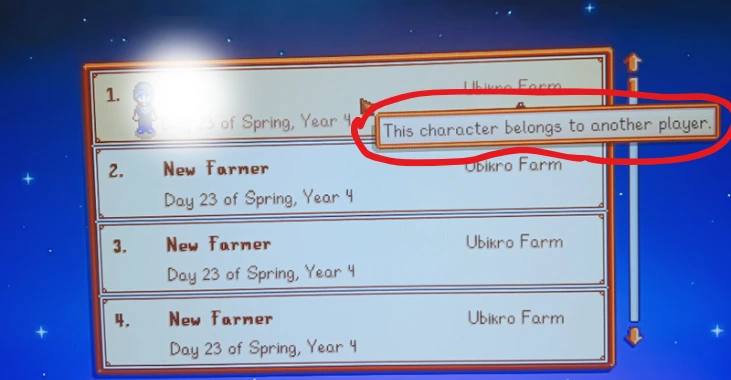
I ran into a weird problem while trying to join a Stardew Valley co-op farm on Steam. My old farmer was still there, but whenever I tried to select the character, the game showed “This character belongs to another player.” It was confusing because I was trying to use my own character, not someone else's. Thankfully, I found a way to reclaim it without starting a new farm.
How I Fixed the Error in Stardew Valley
The solution was a chat command called /unlinkPlayer. It allows the person hosting the farm to release a character that the game still considers assigned to another player.
Here's what worked for me:
Ask the person hosting the farm to load the existing save through Co-op in Stardew Valley.
Once the host is inside the farm, they need to press T on the keyboard to open the in-game chat.
Have the host enter the following command:
/unlinkPlayer CharacterNameReplace
CharacterNamewith the name of your old farmer, then press Enter.Join the co-op farm again through Steam and select your original character.
For example, if your farmer is named Armin, the command would be /unlinkPlayer Armin.
The important part is that the host must enter the command, not the player who is having trouble joining.
This works because the command removes the character's existing player assignment, allowing someone to claim it again. It doesn't require creating a new farmer or deleting the old one.
The command is also an official feature introduced in Stardew Valley update 1.6.9, so you don't need to install a mod or manually edit the save file.
What If Your Character Is Still Locked?
If you're still getting the same message, make sure the host entered your farmer's name, not your Steam username. Double-check the spelling, especially if the character's name contains spaces.
It's also worth checking that both players have updated Stardew Valley. The command was added in version 1.6.9, so an older version won't have it.
Another thing to remember is that unlinking a farmer makes it available for the next player who claims it. If you're playing with several friends, make sure you're the one reconnecting to that character.
I would avoid deleting cabins or changing the save file just to get around this error. Removing a cabin also removes its occupant from the game, which is a much bigger change than simply releasing a character's assignment.
If your old farmer is still visible on the selection screen, try the unlink command first. You may be able to get back to your original character without losing all the progress you've made.