



You ever open Snapchat, scroll through your friend list, and notice that little green dot on Snapchat hanging out next to someone’s Bitmoji? Yeah, that tiny thing. At first, I thought it was a glitch or some new emoji feature Snapchat was testing (they love doing that). But nope, turns out it actually means something. And depending on where you see it, it can either be kinda helpful… or just plain confusing.
So if you've been wondering what that green dot really means, how long it sticks around, or if there's a way to turn it off, you're not alone. I’ve gone down the rabbit hole, tested it myself, and dug through all the settings to bring you everything you need to know. Whether you're just curious or lowkey trying to ghost someone (hey, no judgment), I’ve got you.
What Is the Green Dot on Snapchat?
Alright, let’s break it down. The green dot on Snapchat is basically a status light. It shows up next to an avatar to indicate recent activity. Snapchat's explanation of the green dot does not say the person is online right now.
But here’s where things get a little more layered. That dot can actually mean two different things, depending on where you see it:
1. Activity Indicator (Beside an Avatar)
This is the one most people notice first. It tells you someone has used Snapchat recently, but it does not tell you when they last opened the app. Don't use it as proof that someone is available to reply.
2. Privacy Indicator (Camera or Microphone Access)
The dot at the top of your screen comes from your phone. On iPhone, a green indicator means the camera is in use, either alone or with the microphone. Microphone-only use shows orange. On Android 12 and later, the green indicator can mean camera or microphone access.
So yeah, same color, two different meanings. One is Snapchat activity; the other is your phone showing what an app is accessing.
How Long Does the Green Dot Stay On Snapchat?
So now that we know what the green dot means, the next question is: how long does it actually hang around? Well, it depends on which version of the green dot we’re talking about.
If It’s the Activity Indicator (next to a friend’s Bitmoji):
Snapchat's help page does not specify an expiry time for its activity dot. There is no official three-to-five-minute timer or guaranteed 24-hour cutoff to rely on.
If It’s the Privacy Indicator (top corner of the screen):
The phone's privacy indicator is tied to camera or microphone access, not a friend's Snapchat activity. Its appearance depends on your phone and what the app is using. The Android indicator can be tapped from Quick Settings to check which app is responsible.
How Accurate Is the Green Dot?
Now here’s the part that trips people up is the green dot actually reliable? Can you trust it to know if someone’s online right now or not?
Short answer: not really.
It is useful for understanding recent activity, but it is not a live presence tracker. Seeing the dot does not tell you whether someone has read your message or is still looking at Snapchat.
If you're trying to figure out whether someone is ignoring you, honestly, don't rely on the dot.
Check Where the Green Dot Appears
Look at what the dot sits beside. A dot attached to a Snapchat avatar is the activity indicator. A dot in your phone's status area is the privacy indicator. They are separate even when both appear while you have Snapchat open.
Can You Turn Off the Green Dot on Snapchat?
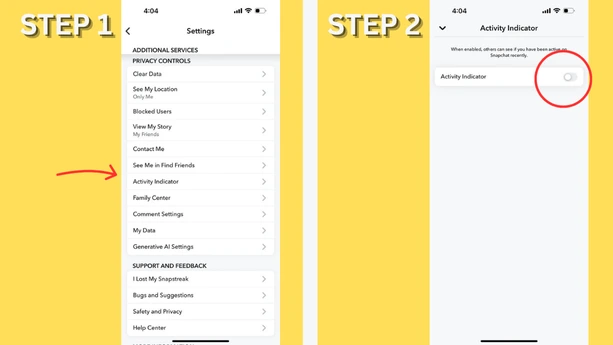
If you would rather not show recent activity, you can turn off Snapchat's Activity Indicator.
Here’s how to do it:
Open Snapchat and tap your profile icon in the top-left corner.
Tap the Settings icon (the gear in the top-right corner) to open your settings.
Under App & Privacy, open My Privacy & Data. Find Activity Indicator under Privacy Choices.
Toggle Activity Indicator off.
This switches off your own activity indicator. It does not control your phone's camera or microphone indicator.
The screenshot below shows an older settings layout. Follow the menu names above if your app looks different.
Wrapping It Up
So, the green dot on Snapchat it’s one of those little things that can spark a lot of questions and overthinking. The avatar dot refers to recent Snapchat activity. The one at the top of your phone belongs to its camera or microphone privacy controls. Nothing too deep or mysterious.
I’ve seen people stress about it like it’s some secret tracker, but really, it’s more like a soft nudge than a spotlight. If someone’s got the dot, they might be active… or they might have just opened the app and stepped away. And if you don’t see it? Doesn’t mean they’re ignoring you could just be that they turned the setting off or haven’t been on for a bit.
At the end of the day, it’s just a small part of the Snapchat experience handy if you want to catch up with friends in the moment, but not worth losing sleep over. Use it, ignore it, or turn it off if it bugs you. Either way, you’ve got the full scoop now.